Northwestern Design Competition: Difference between revisions
From Mech
Jump to navigationJump to search
Content deleted Content added
NickMarchuk (talk | contribs) No edit summary |
NickMarchuk (talk | contribs) |
||
| Line 1: | Line 1: | ||
==DC2013== |
==DC2013== |
||
Spring Quarter Schedule |
|||
* Arena layout - to do, very simple purple/white vinyl banner |
|||
| ⚫ | |||
* Prey robot |
|||
| ⚫ | |||
** Schematic here when available |
|||
| ⚫ | |||
** Sample Code here when available |
|||
** write up |
|||
** assignment |
|||
| ⚫ | |||
| ⚫ | |||
** Press the USER button, and the wheel rotates 180 degrees |
|||
| ⚫ | |||
| ⚫ | |||
** Demo your chassis |
|||
* '''Milestone 8''' - Driving and sensing the world |
|||
| ⚫ | |||
** Demo your robot driving around the arena and sensing things |
|||
* '''Milestone 9''' - Identify prey and drive towards them |
|||
| ⚫ | |||
** Demo your robot chasing Prey |
|||
* '''Milestone 10''' - Operational robot, demo for E-Week |
|||
** Demo due by 4/15/2013, demo at E-Week in Tech lobby |
|||
** Show how your robot works |
|||
| ⚫ | |||
** 4/18/2013, Noon in the machine shop |
|||
Useful things: |
|||
* Write-ups |
|||
** [[Media:DC2013milestone2.pdf | DC2013milestone2.pdf]] |
|||
** [[Media:DC2013milestone3.pdf | DC2013milestone3.pdf]] |
|||
** [[Media:DC2013_laser_cutter_design.pdf | How to design parts that can be made on the laser cutter]] |
|||
** [[Media:workshop5.dxf | workshop5.dxf - parts that mount the laser, sensors and servo]] for reference |
|||
** [[Media:DC2013_hbridge_motors.pdf | How to use an h-bridge and a DC motor]] |
|||
** [[Media:DC2013_3dprinting_design.pdf | How to design parts that can be 3D printed]] |
|||
* Code |
|||
** [[Media:NU32.c| NU32.c]], [[Media:NU32.h | NU32.h]], [[Media:NU32bootloaded.ld | NU32bootloaded.ld]] |
|||
** [[Media:DC2013_Milestone2.c| DC2013_Milestone2.c]] |
|||
** [[Media:DC2013_milestone3.c| DC2013_milestone3.c]] |
|||
** [[Media:workshop5.c | workshop5.c - sweep the servo when the user button is pressed, save the data to an array]] |
|||
** [[Media:workshop6.c | workshop6.c - drive a DC motor using PWM with an h-bridge and sense its position with a reflectance sensor]] |
|||
* NU32 |
* NU32 |
||
** Download: MPLAB X IDE and MPLAB XC32 Compiler from [http://www.microchip.com/pagehandler/en-us/family/mplabx/#downloads http://www.microchip.com/pagehandler/en-us/family/mplabx/#downloads] |
** Download: MPLAB X IDE and MPLAB XC32 Compiler from [http://www.microchip.com/pagehandler/en-us/family/mplabx/#downloads http://www.microchip.com/pagehandler/en-us/family/mplabx/#downloads] |
||
| Line 12: | Line 53: | ||
** and [[Media:NU32_2012.c| NU32_2012.c]], [[Media:NU32_2012.h | NU32_2012.h]] instead of NU32.c and NU32.h |
** and [[Media:NU32_2012.c| NU32_2012.c]], [[Media:NU32_2012.h | NU32_2012.h]] instead of NU32.c and NU32.h |
||
Winter 2013 Schedule |
|||
* '''Workshop 1''' - Prey robot deconstruction |
* '''Workshop 1''' - Prey robot deconstruction |
||
** Tue, 1/15/2013, 6pm, Ford B100 |
** Tue, 1/15/2013, 6pm, Ford B100 |
||
| Line 56: | Line 97: | ||
** [[Media:workshop5.dxf | workshop5.dxf - parts that mount the laser, sensors and servo]] for reference |
** [[Media:workshop5.dxf | workshop5.dxf - parts that mount the laser, sensors and servo]] for reference |
||
** [[Media:workshop5.c | workshop5.c - sweep the servo when the user button is pressed, save the data to an array]] |
** [[Media:workshop5.c | workshop5.c - sweep the servo when the user button is pressed, save the data to an array]] |
||
** [[Media:DC2013_integrating_parts.pdf | How to attach parts from the laser cutter to sensors and actuators]] |
|||
* '''Milestone 5''' - Target hunting |
* '''Milestone 5''' - Target hunting |
||
| Line 63: | Line 103: | ||
** Sweep the laser, find the target, and point at it '''DONE!''' |
** Sweep the laser, find the target, and point at it '''DONE!''' |
||
| ⚫ | |||
| ⚫ | |||
** How to drive a DC motor with an H-bridge |
|||
** How to make a cheap wheel and caster |
|||
** How to follow a wall |
|||
| ⚫ | |||
** '''Due by Wed, 2/27/2013''' |
|||
** Build a little mobile robot with 2 bump sensors |
|||
* '''Workshop 7''' - Controlled turning |
|||
| ⚫ | |||
** Continue building a little mobile robot |
|||
| ⚫ | |||
** '''Due by Wed, 3/6/2013''' |
|||
** Program your little robot to drive, aka Milestone 2 |
|||
* Workshop 8 - |
|||
| ⚫ | |||
| ⚫ | |||
* Milestone 8 - |
|||
| ⚫ | |||
** |
|||
'''Reading week 6/11-5, finals week 6/18-22, break 3/25-29''' |
'''Reading week 6/11-5, finals week 6/18-22, break 3/25-29''' |
||
'''Spring quarter''' |
|||
Wed 4/3 - Using the Makerbot Replicator 2, How to design parts that can be made on the Makerbot, Makerbot training, Sign up for Makerbot training, get trained |
|||
Wed 4/10 |
|||
Wed 4/17 Midterm milestone |
|||
Wed 4/24 |
|||
Wed 5/1 |
|||
Wed 5/8 |
|||
Wed 5/15 |
|||
| ⚫ | |||
* Workshop 8 - Robot sensors and actuators |
|||
** Begin Wed, x/2013 |
|||
** Pick up your NU32, drive motors, battery, battery charger, sensors |
|||
** What kind of sensors are out there? Where to look for them? |
|||
* Milestone 8 - NU32 Demonstration |
|||
| ⚫ | |||
** Program your NU32 to turn on your motors with an h-bridge |
|||
** Read distance with the ultrasonic sensor |
|||
==DC2012== |
==DC2012== |
||
Revision as of 12:27, 28 March 2013
DC2013
Spring Quarter Schedule
- Workshop 6 - H-Bridges, DC motor control, wheel sensing
- Wed, 4/3/2013, 6pm in mechatronics lab
- code
- write up
- assignment
- Milestone 6 - Wheel control
- Demo due by 3/17/2013
- Press the USER button, and the wheel rotates 180 degrees
- Milestone 7 - Complete chassis
- Demo due by 3/24/2013
- Demo your chassis
- Milestone 8 - Driving and sensing the world
- Demo due by 4/1/2013
- Demo your robot driving around the arena and sensing things
- Milestone 9 - Identify prey and drive towards them
- Demo due by 4/8/2013
- Demo your robot chasing Prey
- Milestone 10 - Operational robot, demo for E-Week
- Demo due by 4/15/2013, demo at E-Week in Tech lobby
- Show how your robot works
- COMPETITION!!!!"""
- 4/18/2013, Noon in the machine shop
Useful things:
- Write-ups
- Code
- NU32
- Download: MPLAB X IDE and MPLAB XC32 Compiler from http://www.microchip.com/pagehandler/en-us/family/mplabx/#downloads
- Download: FTDI Drivers from http://www.ftdichip.com/Drivers/VCP.htm
- Download: NU32_Utility from NU32:_Software_to_Install
- NU32 from 2012
- We have a lot of left over boards from 2012 but you have to use NU32_Utility_v5 from NU32:_Software_to_Install
- and NU32_2012.c, NU32_2012.h instead of NU32.c and NU32.h
Winter 2013 Schedule
- Workshop 1 - Prey robot deconstruction
- Tue, 1/15/2013, 6pm, Ford B100
- Milestone 1 - Prey robot -> Demobot
- Due by Wed, 1/23/2013
- Show off your Demobot, made from a deconstructed Prey robot DONE!
- Workshop 2 - Programming the PIC32
- Begin Wed, 1/23/2013, meeting in the Mechatronics lab at 6pm
- How to program the PIC32 on the NU32
- Sample code - NU32test.hex, SimplePIC.c, NU32bootloaded.ld, talkingPIC.c, NU32.c, NU32.h
- Milestone 2 - Programming the PIC32
- Due by Wed, 1/30/2013
- Code Template: DC2013_Milestone2.c, NU32.c, NU32.h, NU32bootloaded.ld
- Complete the assignment here: DC2013milestone2.pdf DONE!
- Workshop 3 - Programming the PIC32
- Begin Wed, 1/30/2013, meeting in the Mechatronics lab at 6pm
- How to program the PIC32 on the NU32, sensors and actuators, soldering
- Sample code - DC2013_milestone3.c
- Milestone 3 - Programming the PIC32, sensors and actuators
- Due by Wed, 2/6/2013
- Potentiometers, phototransistors, RC servos, ultrasonic distance sensors
- Complete the assignment here: DC2013milestone3.pdf DONE!
- Workshop 4 - Using the laser cutter
- Begin Wed, 2/6/2013
- How to design parts that can be made on the laser cutter
- Milestone 4 - Laser cutter training
- Due By Wed, 2/20/2013
- Get trained on the laser cutter
- Design and build a robot gripper or mechanism DONE!
- Workshop 5 - RC servo and Laser detection
- Begin Wed, 2/13/2013, at 6pm in the mechatronics lab
- How to use a laser to detect retroreflective tape
- How to buffer and analyse data
- Combining the laser and RC servo to make a moving sensor
- workshop5.dxf - parts that mount the laser, sensors and servo for reference
- workshop5.c - sweep the servo when the user button is pressed, save the data to an array
- Milestone 5 - Target hunting
- Due by Wed, 2/20/2013
- Mount the laser on the servo
- Sweep the laser, find the target, and point at it DONE!
Reading week 6/11-5, finals week 6/18-22, break 3/25-29
DC2012
Scale arena:

Equipment
- NU32, USB cable, 6V power supply
- 2 drive motors, 2 motor mounts, 2 wheels
- large and small RC servos
- red and IR lasers
- 12"x24"x0.118" clear acrylic sheets
- AA batteries and packs
PCB


Workshop 1, Wednesday 1/18 5:30-7pm Tech L221, makeup Thursday 1/19 9-11am Mechatronics Lab
- How to program in MPLABX
- How to use the bootloader to put code on the NU32
- Digital output I/O (read a button and flash an LED)
- Analog input
- PWM output
- Sample code: Sample code for Workshop 1
Milestone 1, due by 1/27
- If a pushbutton is pressed, read the value of a potentiometer and change the brightness of an LED to the corresponding value with PWM
Workshop 2, Thursday 2/9 6-7pm Tech L221, makeup Friday 2/10 9-11am Mechatronics Lab
- Optical isolation for motors and RC servos
- Powering a motor with an h-bridge
- Writing to the 16x2 character LCD
- Laser detection of retroreflective tape / Optical line detection
- 2 1/2D design
Milestone 2, Due week of Feb 27
- Optically isolate a motor
- Read a potentiometer and write its voltage to the LCD
- Control the motor velocity based on the potentiometer reading
- Control an RC servo
- Detect a 3/4" wide black line on white paper with a phototransistor and LED
Laser cutting Workshop, Week of Apr 2
- Laser cutting
- 2.5D design
- Making a chassis, mounting motors and sensors
Chassis Milestone, Due Apr 13
- Demonstrate a robot chassis that can drive around the arena, bonus points for following a line, detecting and moving towards the moving goals, and detecting and moving towards a crate
Midterm Milestone, Due Apr 30 / May 1 / May 2
- Demonstrate some strategy - from the starting position, go get a crate and bring to back towards the goal
Pre-competition Milestone, Due May 9
- Demonstrate some advanced strategy - score several points
Competition May 19!
DC2011
Milestone 1
- On a button press, read the value of a potentiometer and change the brightness of an LED accordingly using PWM. Note: Do not use an h-bridge or motor as previously assigned.
- Due before Workshop 2 on Wed, 2/9.
- Sample code from Workshop 1
Milestone 2
- Due before Workshop 3 on Wed, 2/23.
- Goals:
- Use code from NU32v2: Nokia 5110 LCD and NU32v2: Analog Input to read a potentiometer and print the voltage to the Nokia 5110
- Optically isolate a motor and control its velocity based on the potentiometer reading
- Do 1 of the following:
- Mount a phototransistor to a laser and detect a cake OR
- Detect a line of electrical tape on white paper with an optoreflector
- Datasheets
- HBridge_L293D.pdf - H-bridge for driving a DC motor
- Optocoupler_A847.pdf - Optocoupler to optically isolate your H-bridge
- HexInverter_74HC04.pdf - Inverting chip to digitize optocoupler output
- Optoreflector_OPB740.pdf - Optoreflector to detect lines or color
- Optoreflector_QRE1113.pdf - Optoreflector to detect lines or color
- Phototransistor_SFH310.pdf - Phototransistor to detect lines, color, or laser reflections
- Notes
- DC2011_WS2_OpticalIsolation.pdf - How to optically isolate an h-bridge and servo motor using the A847 and 74HC04
- DC2011_WS2_OpticalSensors.pdf - How to use the SFH310 to detect a cake and use the OPB740 or QRE1113 for line following
- DC2011_WS2_Code.zip - Example code for the NU32v2 that will:
- Control a DC motor hooked up to an optically isolated h-bridge, and control an optically isolated RC servo motor
- Respond to serial commands to control the motors, write to the Nokia 5110, and read two analog signals
Milestone 4
- Due before Wed, 3/16
- Finish laser training, at least one person per team
- Construct a prototype chassis for your robot
- Do one of the following:
- Follow part of the line on the 36" x 96" printout of this pdf
- Detect a cake somewhere on the floor and drive to it
Breakout Boards
- Image of the breakout boards
- Circuit schematic of the breakout boards
- This board contains:
- A spot to plug in the NU32v2 with some prototyping area
- The optical isolation circuit with some prototyping area, the same size as the NU32v2 breakout board so it can be stacked on top
- 8 SFH310 with LED breakout boards
- 4 SFH310 with laser diode breakout boards
- 1 LIS352AX accelerometer breakout board
- 1 LSM303DHL tilt-compensated compass breakout board
- 1 LPY550AL gyroscope breakout board
- 1 LS7366R encoder decoder breakout board
- 1 TCS3103 color sensor breakout board
- How to use the boards:
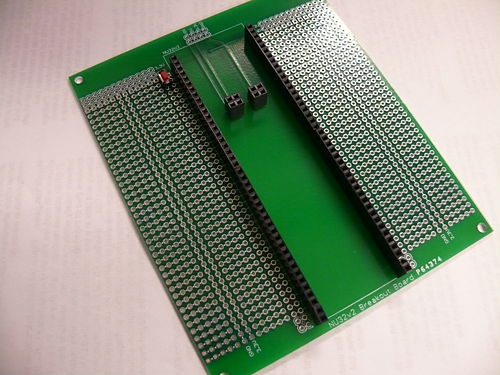
Solder female header pins to the NU32v2 Breakout Board so that you can plug in and remove your NU32v2 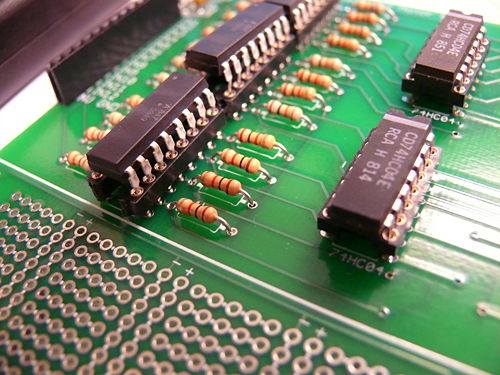
Solder sockets to the Optically Isolated Motor Board so you can remove burnt out chips 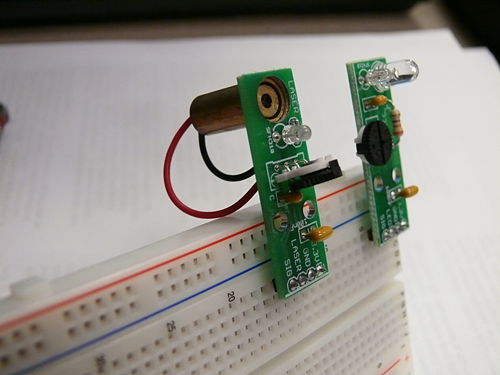
The LED and Laser Phototransistor breakout boards will make it easier to attach wires to the sensors 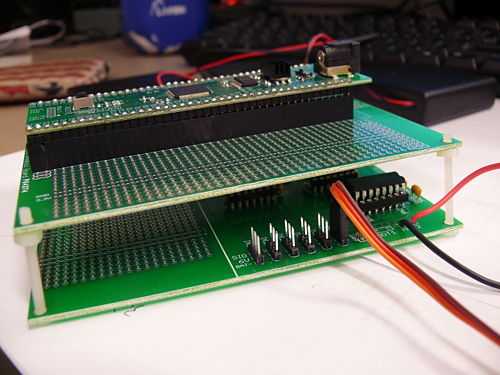
You can stack the NU32v2 breakout board with the Optically Isolated board


Brochure for 2011
Previous Years
Wiki pages on sensors, actuators, programming, and microcontrollers: use pages below
- Parts in the DC2008 quick start pack
- PIC C intro slides, as presented 2008/01/24 (pdf)
- PIC interfacing slides, as presented 2008/01/28 (pdf)
- Link to all sample PIC code here.
Sensors and actuators for DC
- Solderless Breadboard & wiring that works
- Using LEDs & IREDs
- Using a laser
- Infrared reflectivity
- Using phototransistors
- Sensing optical tape
- Comparators : the analog digital interface
- Faulhaber MiniMotor SA gearmotor with encoder, as well as the local wiki page
- Adding a magnetic encoder to a GM3 Gearmotor
- Using magnetic switches (Hall Effect)
- Driving high-current devices: several options
- Driving a Stepper Motor
- Driving an RC Servo
- Accelerometers
- Strain gauges
- Basic Stamp Microcontroller Not recommended for DC2008
- NiMH rechargable batteries and chargers
Prof. Peshkin's favorite datasheets
